Enterprise L&D teams struggle to deliver strategic training initiatives because they lack visibility into their actual capacity. This makes it challenging to see who’s working on what, how many hours are allocated, or when teams are at capacity.
When business stakeholders request new training programs, L&D managers can’t assess feasibility. This forces them to either:
- Overcommit in ways that risk burnout, missed deadlines, and quality issues
- Turn down requests without clear justification, damaging L&D’s credibility as a strategic partner
L&D capacity turns scattered workload into a governed process by tracking who’s available, what skills are needed, and which projects deliver the most business value. This helps L&D set realistic timelines, allocate resources to high-value work, and prove capacity needs to leadership with actual data.
In this article, we’ll discuss how to improve L&D capacity. You’ll also learn best practices for implementation and tools you can use for operational control and strategic alignment with business outcomes.
What Is L&D Capacity?
L&D capacity is the total amount of learning work an L&D team can realistically deliver within a given timeframe based on available hours, skills, and resources. It measures team bandwidth against demand to determine whether L&D can accept new projects without overcommitting.
This allows L&D teams to forecast workload accurately, make data-driven decisions about which requests to accept or defer, and link strategic initiatives to measurable business outcomes.
Core Elements of L&D Capacity Planning
Enterprise L&D teams accept hundreds of training requests per year without knowing if they have the hours to deliver them. Without visibility into total workload, managers guess at timelines, overcommit resources, and can’t prove to executives when the team needs more headcount.
Here are the core elements of L&D capacity:
- Available Hours: Calculate total working hours per team member, accounting for meetings, administrative work, paid time off, and non-project responsibilities. This provides the baseline for the amount of work the team can deliver.
- Skills Inventory: Map which team members can handle which types of projects. This helps you decide when to use internal staff vs. contractors.
- Current Workload: Track hours already committed across all active and approved projects. This creates visibility into where team capacity is currently allocated and which projects are consuming the most resources.
- Demand Forecasting: Estimate incoming work based on historical patterns, planned business initiatives, and known requirements. This helps teams prepare for future workload.
- Utilization Tracking: Monitor what percentage of available capacity is committed to work. This helps L&D prove actual workload levels when requesting additional headcount or declining new projects.
- Resource Constraints: Budget for external vendors, technology licenses, subject matter expert availability, and tooling that allows or limits what your team can produce.
L&D Capacity Challenges That Enterprise Teams Face
Here are some L&D capacity planning challenges enterprise teams face:
Data Is Scattered Across Multiple Systems
L&D teams need historical project data to forecast capacity. But that data either isn’t collected or scattered across spreadsheets, emails, and chat messages. This prevents teams from tracking hours spent on past projects or implementing the right skills for different training types. And L&D can’t build the credibility needed for strategic planning conversations.
Lack of Granular Details
Teams struggle to decide how granular their capacity planning needs to be. One manager tracks capacity by individual team members. Another might track by role. A third may track available hours without considering which skills those hours represent.
Less detail means inaccurate forecasts, while too much detail adds more work. This prevents leadership from knowing the future capacity or whether the current capacity levels align with business objectives.
Spreadsheets Can’t Handle the Workload Complexity
L&D teams often use multiple spreadsheets to track capacity against demand. One sheet tracks team availability. Another tracks active projects. A third calculates utilization rates. And a fourth forecasts demand by quarter. Each sheet has formulas that break when someone adds a row. Manual updates don’t sync across files.
This creates version control chaos. Teams end up wasting hours reconciling old or duplicate data instead of making strategic decisions.
Unstructured Data from Multiple Departments
L&D capacity planning requires information from HR, Finance, and business units. But that data doesn’t flow automatically. HR knows two designers are leaving next quarter. Finance approved budget cuts that affect vendor spending. Sales is planning a product launch that requires training support.
None of this reaches L&D’s capacity model until someone manually updates it weeks later. By then, L&D has already committed to projects they won’t have the staff or budget to deliver.
Teams Can’t Justify Headcount
When L&D asks for additional staff, stakeholders demand proof. They want current utilization rates, declined projects, and workload data. But L&D lacks structured data to defend its case.
For example, Delta Community Credit Union (DCCU), one of the largest credit unions, used PDF forms and spreadsheets to manage training programs. This made it impossible to see project volume, track team capacity, or justify headcount needs.
Cognota helped them implement capacity planning with real-time tracking of active projects and resource availability. This allowed DCCU to predict workloads and secure headcount approval.

Best Practices for L&D Capacity Planning
Here are the best practices to build and improve your L&D capacity:
Conduct Demand Forecasting Based on Business Cycles
Identify your business cycles to plan capacity months in advance. These are the predictable and recurring events in your organization that create foreseeable patterns of training demand at specific times.
You can use these insights to build a 12-month demand calendar and overlay it with your team’s actual available hours. This allows your team to:
- Pre-allocate capacity during known high-demand periods
- Identify conflicts before accepting new work
- Have evidence-based conversations when stakeholders request work during peak periods
- Make strategic trade-off decisions grounded in actual capacity.
Establish Capacity Thresholds by Role
Calculate available capacity at the individual role level rather than treating your L&D team as one resource pool.
Make sure to set realistic utilization thresholds for each role. For example, if someone has 20 hours per week, schedule them for 16-18 hours. The remaining hours can be allocated to unexpected urgent work, scope creep, and the mental space needed for quality work.
This helps your team:
- Identify which specific roles are bottlenecks and which have available capacity
- Make hiring or upskilling decisions based on real capacity data
- Match incoming requests to available skill sets instead of declining valuable work
- Prevent burnout by catching overallocation before it becomes critical.
Implement Prioritization Scoring During Intake
Not all training requests deliver equal business value. Score each request against standardized criteria to identify which demand matters the most. Common criteria include:
- Business impact (revenue, risk mitigation, strategic alignment)
- Urgency vs. importance (true deadline vs. stakeholder impatience)
- Audience size and criticality (reach and role importance)
- Feasibility with available capacity
- Alignment with L&D strategy
You can add scores 1-5 for each criterion and multiply by the weight to calculate the total score. Set a minimum threshold for acceptance, with anything below that going to a waitlist or getting declined with clear reasoning.
This allows your team to:
- Make objective comparisons between competing requests
- Decline low-value work with a documented rationale
- Show real business value to leadership
But doing this manually is time-consuming and labor-intensive. Cognota operationalizes prioritization with configurable intake forms, structured workflows that enforce approval decisions, and dashboards that show capacity tied to business value.
How Cognota Optimizes L&D Capacity for Enterprise Teams
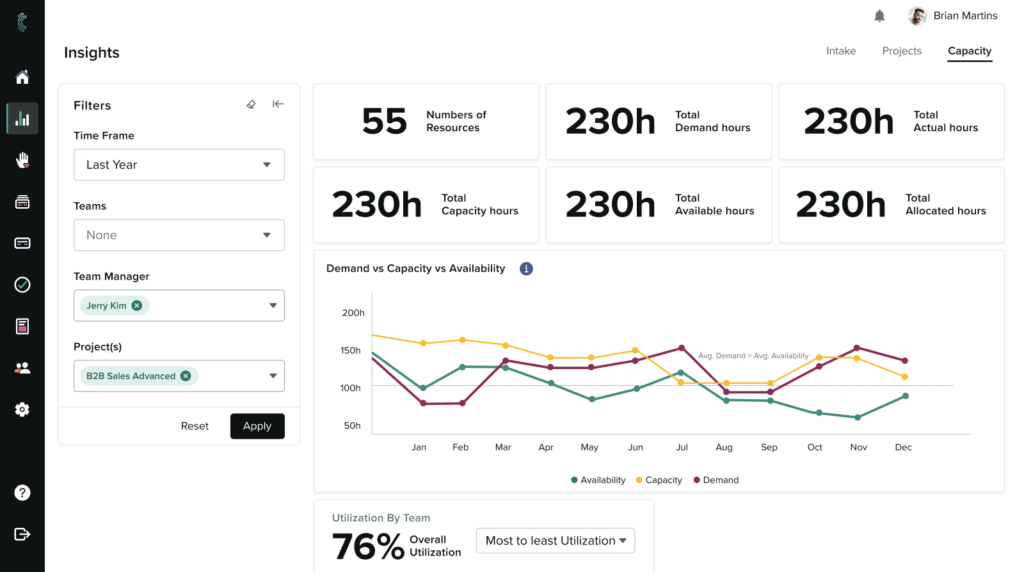
Cognota is a LearnOps platform built for enterprise L&D teams. It offers capacity management capabilities so teams can balance workloads, prioritize high-value demand, and deliver projects with a realistic timeline.
Our platform gives you visibility into team capacity, so you can track who’s overworked, who has available hours in upcoming weeks, and justify investments by showing evidence-backed business outcomes.
Here’s how Cognota helps you optimize L&D capacity, align it with business objectives, and prove ROI:
Real-Time Capacity Views Across Roles and Teams
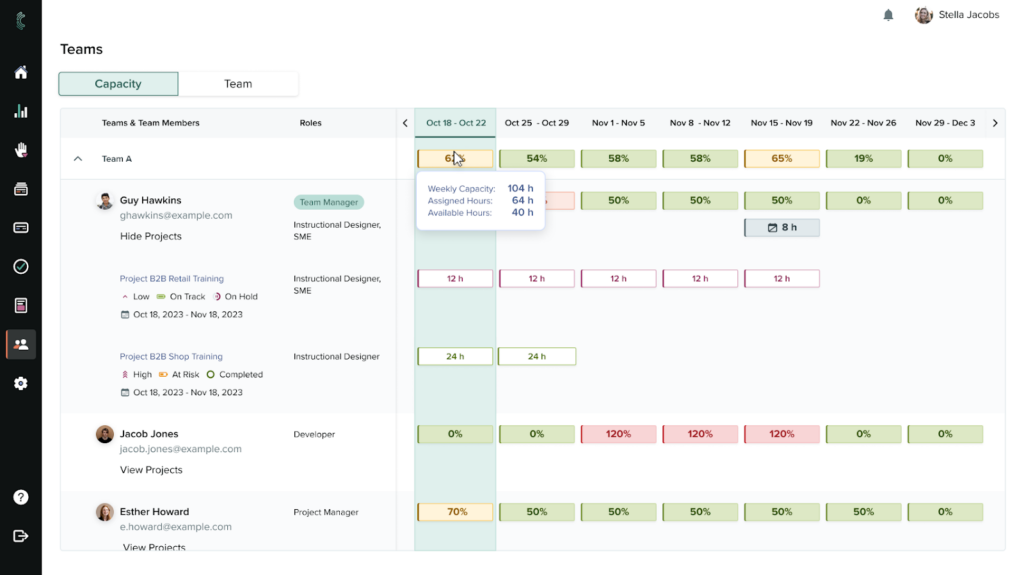
Cognota’s capacity planning feature gives managers a complete view of team availability. You can filter capacity data by role, time period, project, or team.
This allows L&D teams to track:
- Assigned projects to each team member
- Weekly allocated hours per member
- Remaining hours
- Resource workload by business unit
- Load split across internal teams and vendors
You can use this data to assign new projects, re-assign resources by strategic priorities, and optimize your team’s time and efforts to deliver high business value.
For example, if finance wants mandatory compliance training by month-end, the capacity view shows your content developers are allocated 95 hours but only have 60 hours available. You can either defer the leadership development project by two weeks, assign 35 hours to an external vendor, or negotiate a mid-next-month delivery date with finance.
Resource Capacity Planning for Quality and Speed
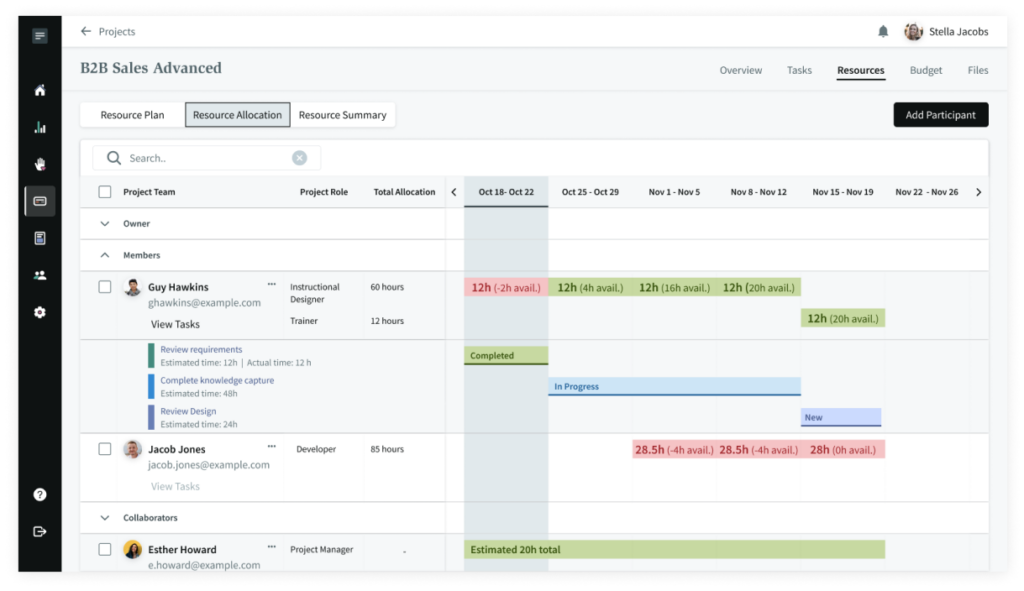
Without linking capacity planning and resource management, L&D teams often accept projects based on total available hours, only to realize that they lack the resources to deliver them on time. This turns every new request into a resource conflict.
Cognota connects project-level resource assignments with team-level capacity, so you can evaluate whether you have the right people available before committing to new requests.
All assignments appear on project cards and roll up into the Resources tab, where you see weekly allocated vs. available hours for each team member. This shows who is over capacity, who has bandwidth, and how work is distributed across the team.
You can assign team members to projects and specify exactly how many hours per week each person will contribute. Add multiple members to a single project with different hour allocations based on their role.
When new training requests come in, you can check resource availability by role and timeframe to make evidence-based decisions based on actual capacity.
If priorities shift, you can reassign more resources between projects directly from the capacity dashboard. This helps you prioritize high-value focus areas and address critical needs.
Budget Tracking for Smart Capacity Planning
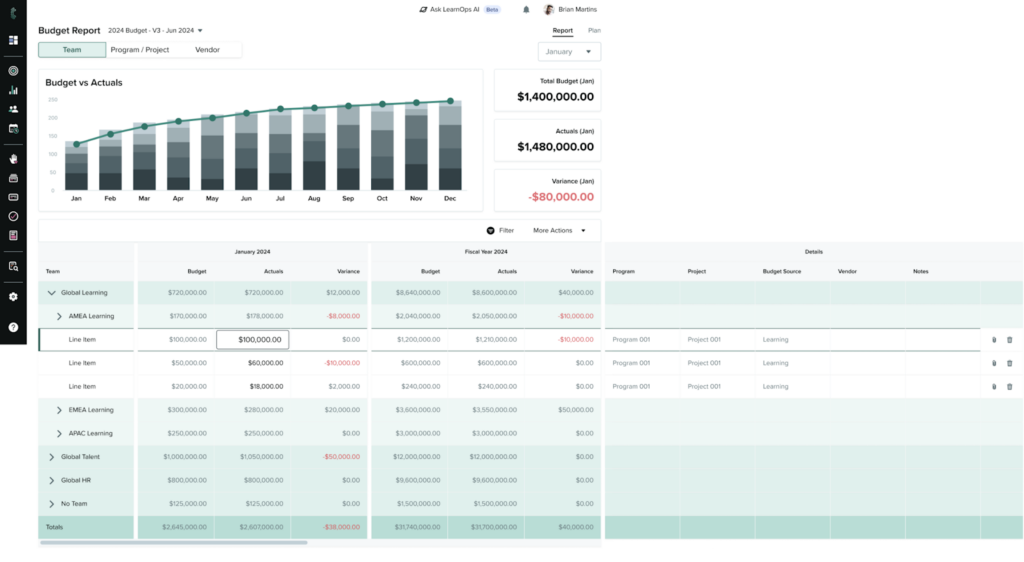
Cognota connects capacity planning and budget data in one view, so you can evaluate whether your team has the hours and funding to deliver learning programs on time.
You can see upcoming project due dates, team utilization, and allocated budget. This allows you to reorganize resources to prioritize programs that require immediate attention.
For example, if three high-priority projects are due next month but your designers are at 95% capacity, and one project is underfunded, you can identify this constraint before deadlines. You decide whether to shift hours from lower-priority work, request additional budget to bring in a contractor, or negotiate timeline extensions based on actual capacity and funding availability.
This helps you justify your L&D spending, improve budget allocation, and maximize resource planning.
Standardized Intake Process to Forecast L&D Capacity
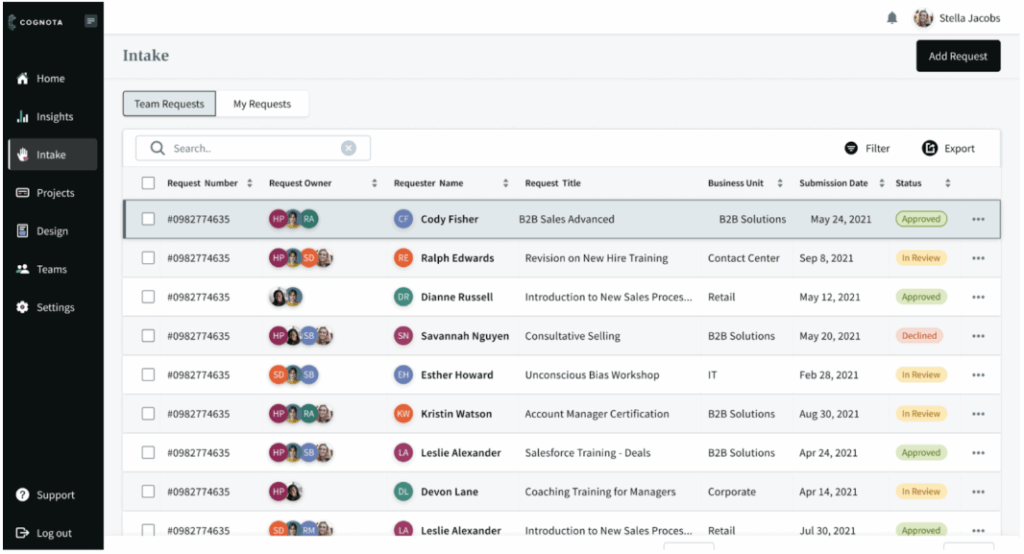
Cognota standardizes training intake and consolidates all incoming requests so you can see total demand across your organization.
This visibility helps L&D leaders identify demand patterns, spot departments that consistently submit requests, and make evidence-based decisions about which requests to accept based on available capacity.
For example, if Cognota shows 47 requests in the approval queue but your capacity view shows designers are at 90% utilization for the next six weeks, you have the data to make the right decision. You can decline lower-priority requests, negotiate extended timelines, or make the case for additional headcount.
L&D Capacity Analytics for Proactive Planning
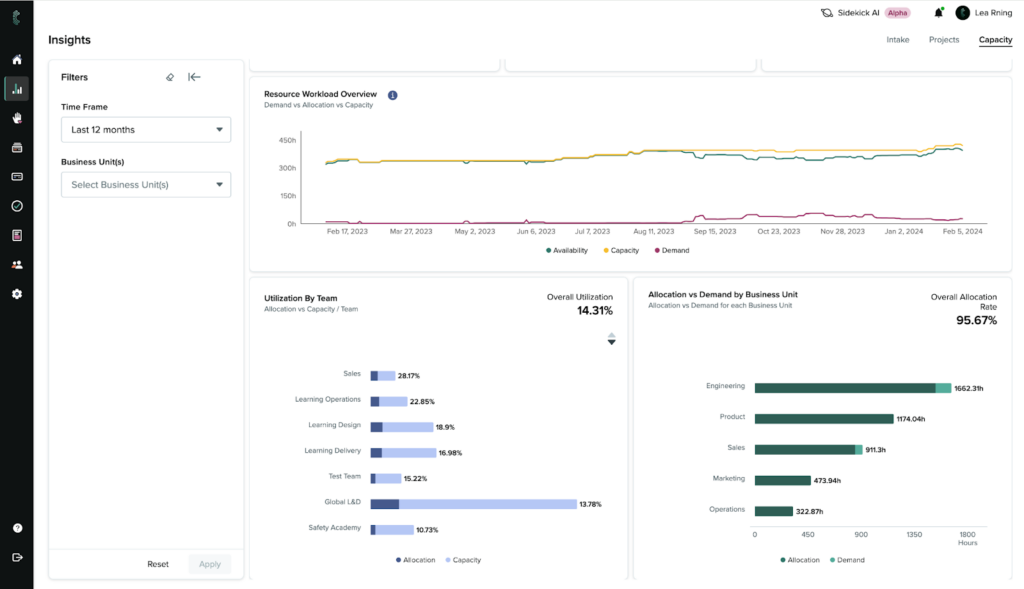
When important metrics like request volume, project status, and member workloads are scattered across spreadsheets and emails, it’s hard to prove ROI to stakeholders.
Cognota offers L&D capacity insights that help L&D leaders understand workload distribution more critically and align it better with business objectives.
Our platform collects data from requests, projects, and teams and turns them into actionable insights to measure impact. It automatically displays these numbers in visual infographics, so it’s easier for stakeholders, business partners, and leaders to analyze and track important metrics.
You can customize your L&D dashboard to display relevant data and generate filterable reports by:
- Time frame
- Resource workload and utilization by team
- Demand vs. allocation by business unit
- Allocation by resource type
- Demand by project category
- Estimated vs. actuals by task type
This helps L&D leaders predict future demand, plan projects proactively, justify investments, maximize resource efficiency, and connect capacity data to business objectives.
How Delta Community Credit Union Used Cognota to Forecast Capacity and Justify Headcount
Delta Community Credit Union (DCCU), one of Georgia’s biggest credit unions, optimized L&D capacity planning using Cognota:
The Problem: Scattered Learning Operations
DCCU’s talent development team was using a PDF form to collect training requests and manage projects in spreadsheets. As the company scaled, the team had no visibility into project volume, resource capacity, or how to justify additional headcount.
Key challenges included:
- Manual intake with zero visibility into volume or business needs
- No system to forecast capacity or justify headcount requests
- Limited transparency between L&D and business stakeholders
The Solution: Capacity Planning with Real-Time Tracking
DCCU implemented Cognota to unify scattered project data and gain visibility into team capacity and workload distribution.
Cognota helped the business:
- Centralize intake via branded portal: Business partners submitted training requests through custom intake forms, making it easier to prioritize requests.
- Forecast capacity and justify headcount: Capacity Planning helped the team forecast availability and justify additional headcount with data-backed business cases.
- Access real-time dashboards: The platform gave L&D and leadership real-time dashboards to measure impact, track project progress, and align learning with organizational goals.
- Increase stakeholder transparency: Business partners were looped in from the start and could track project progress, improving collaboration.
The Results: Additional Staffing and Smarter Capacity Management
With capacity planning and transparency, Cognota helped DCCU secure approval for headcount growth.
The team gained:
- Real-time visibility into who was over capacity and who had bandwidth for new work
- Faster resource planning by seeing conflicts before they become critical
- Stronger alignment with business priorities by showing which departments generated the most demand
- Clear ROI story to share with leadership about L&D’s operational impact.
Bottom Line
L&D capacity planning connects workload visibility with resource allocation so teams can make smarter decisions. This allows L&D leaders to justify headcount requests, prevent team burnout, and align capacity with the highest-value business priorities.
But L&D teams lack operational visibility to balance workloads with demand at scale. Cognota is a LearnOps platform that gives L&D teams real-time visibility into team capacity, project volume, and workload distribution. This helps you forecast demand accurately, distribute resources evenly, and deliver quality learning projects that improve business performance.
Book a demo to learn how Cognota helps you optimize L&D capacity, prioritize high-value projects, and prove ROI.