Aligning learning programs with business objectives is the number one priority for L&D leaders. But alignment doesn’t start in the boardroom. It starts with something simple: a clear training request form.
According to a Harvard study, 44% of organizations are prioritizing workforce upskilling and reskilling more than last year. That means more requests and more pressure on L&D to deliver programs that tie back to real business outcomes. But without structure, every training request looks equally valid and urgent.
A training request form fixes this at the source. It gives every stakeholder the same entry point and captures the context L&D needs to prioritize, scope, and build the right programs.
This article covers 14 training request form templates you can use to standardize your intake process. We’ll also discuss how you can optimize your training intake process to align with your business objectives.
What Is a Training Request Form?
A training request form is a standardized document that L&D teams use to capture, evaluate, and prioritize requests for training from across their organization.
The training request form helps you determine what information comes in, how complete it is, and whether the L&D team has what it needs to decide whether the training request should move forward.
Your training request form should ask requesters to outline:
- Who is the intended audience of the training?
- What organizational training need is prompting the request?
- How will the success of the training be measured?
- What are the anticipated business outcomes of the training?
For example, if a department head wants a compliance training program, a structured form requires them to answer a set of questions. They should define the audience, the performance gap, the timeline, and the success metrics.
Why Use a Training Request Form Template?
Building a training request form from scratch means guessing which questions to include, how to phrase them, and how much detail to ask for. Get it wrong, and you either collect too little context to evaluate the request or overwhelm requesters with a form so long that they default back to email.
Templates solve this. They’re built by experienced L&D professionals who have already tested which fields capture the right information for scoping and prioritization. Instead of spending weeks iterating on form design, your team starts with a structure that works and adjusts from there.
Templates also speed up adoption across the organization. A clean, structured form signals to business partners that the intake process is professional and worth their time. They’re more likely to engage seriously and provide the detail your team needs to make informed decisions.

14 Free Training Request Form Templates to Download Now
Here are the 14 best training request form templates built by experienced L&D professionals for course scoping and development.
1. Cognota’s Training Request Form Template
Cognota is a LearnOps platform built for enterprise L&D teams. Our request form template helps connect every request to a measurable business outcome.
The template allows you and your team to:
- Capture requester details, business goals, and audience data in one structured format
- Identify the performance gap early to estimate the project scope
- Document expected behavior changes to understand success criteria before course development
- Flag whether training already exists to avoid building what can be bought or repurposed
- Surface success metrics at intake to measure ROI for each project.
This gives your team the data to prioritize what gets built and a head start on the analysis phase if a course moves forward.
The template is available in PDF and Word Document formats, and you can edit it for various training types. If you’re looking for a powerful training request form template that can be used across business units, use this one.
2. Training Industry’s Training Request Form Template
Training Industry offers training templates, research, and other resources developed by certified training managers.
Their training request form template is a Word document featuring 20 questions that capture the critical information your team needs for course development. It covers training modality, existing content in the LMS, completion reporting requirements, and target deadlines.
3. Jotform’s Training Course Request Form Template
Jotform’s training request template is an online form submitted by a community member. It’s built for employees to send training requests to managers directly.
The template is fully digital and not available in Word or PDF format, which makes it easy to share via link or embed directly on an intranet.
4. Paperform’s Training Request Template
This template from Paperform is not free, but Paperform does offer a free trial, during which you can download this and give it a trial run. Paperform forms can be integrated with hundreds of third-party tools, like Google Sheets, HR systems, and even internal databases.
5. Forms.app’s Online Training Request Form
forms.app offers a free version with basic submission limits and a mobile-friendly design. It integrates with HubSpot, Slack, and Trello, making it a practical option for smaller teams that want their intake form connected to tools they already use daily.
6. Template.net’s PDF Training Request Forms
Template.net offers a bundle of 14 training request form templates, all in PDF format and downloadable as a single ZIP file. It’s a practical option if your team prefers offline, printable forms and wants multiple layout options in one download.
7. SampleForms’ Training Request Form Templates
SampleForms provides several training request templates across Word, Excel, and PDF formats, giving you more flexibility than PDF-only bundles. It’s best for teams that use Microsoft Office Tools.
8. SampleTemplates’ Training Request Forms
SampleTemplates offers around a dozen templates in various formats. Worth noting: not all are designed for L&D teams building courses from scratch. Some are geared toward employees requesting funding or technical assistance for existing training, so review carefully before selecting.
9. 123 Form Builder’s Training Request Form
123 Form Builder’s template is a digital form that requires a free account to use. The free version supports up to 100 submissions per month, which may be limiting for enterprise teams with high intake volume.
10. Bizmanualz Training Request Template
Bizmanualz offers a low-cost Word template at $3.99. Although it’s not free, it’s still affordable for teams that need a clean, editable starting point for an offline intake process.
11. Training Request Form by US Legal Forms
This template is more of a consent and authorization document. It doesn’t capture training needs, business goals, or audience details. But if your approval process requires a formal sign-off, it can serve that specific step.
12. Wrike’s Incoming Requests and Approvals Template
Wrike’s template is built for general request management, not training specifically. It covers request intake and approval routing, which teams can adapt for L&D use.
13. Formplus’ Employee Training Request Form
This template is easy-to-use and designed for employees requesting approval to attend an existing course. But it may not be suitable for teams that need to create new courses from scratch.
14. Facilitate Training’s Professional Development Request Form
This is a downloadable PDF developed by Facilitated Training, a courseware provider. It covers professional development requests but requires printing or uploading to a shared drive.
How to Create a Training Request Form: Step-by-Step Guide
Although many of the above-mentioned training request templates are suitable for L&D, they might not fit every use case. Building your own gives you full control over what gets captured, how requests are routed, and how your team evaluates them.
Here’s a step-by-step guide on how to do it:
Step 1: Define Your Evaluation Criteria
Before designing any field, decide how your team will evaluate incoming requests. Think about what information you need to approve, waitlist, or decline a request.
Most enterprise L&D teams evaluate requests based on business impact, audience size, strategic alignment, and available capacity. Write those criteria down. Every field you add to your form should map to those standards.
Step 2: Identify Your Request Types
Not all training requests are the same. For example, compliance training has a different urgency and scope than a leadership development program.
List the request types your team regularly receives. This will tell you whether you need one form with conditional logic or multiple forms for different use cases.
Step 3: Build Your Core Field Set
Every training request form needs a baseline set of fields regardless of request type. At a minimum, include:
- Requester name, role, and department
- Senior stakeholder or sponsor name
- Description of the business problem or performance gap
- Target audience and estimated learner count
- Requested delivery date and any hard deadlines
- How success will be measured
- Estimated budget, if known.
You can also use online tools to create and design training request forms faster.
Step 4: Add Conditional Fields for Specific Request Types
Layer in conditional questions that appear based on the request type selected. A request for a new course from scratch might trigger fields about existing content, preferred modality, and SME availability. A request to update an existing course would list different questions.
This keeps the form lean for simple requests while capturing the details your team needs for complex ones.
Step 5: Define the Workflow Before You Launch
Before going live, make sure you define your L&D workflows. You can track who receives new submissions, what the review SLA is, and what status updates requesters will receive. Even a simple three-stage workflow, such as received, in review, and decision made, sets clear expectations and reduces follow-up requests.
How Cognota Standardizes Training Request Forms to Speed Up Course Development
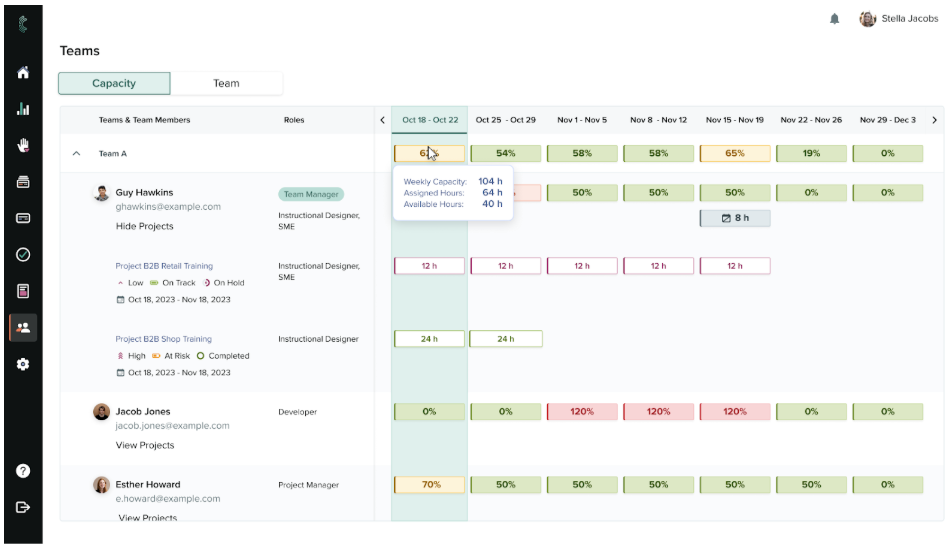
Cognota is a LearnOps platform built for enterprise L&D teams that manage a large number of requests and projects. It unifies training intake with project tracking, content development, and analytics into one system.
Our platform gives your team configurable, ready-to-use forms that capture the business context you need from the moment a request comes in. Every request enters through one governed channel that the entire L&D team can see. This helps you maintain a centralized intake process.

Here’s how Cognota centralizes training requests:
Custom Request Forms for Structured Intake Process
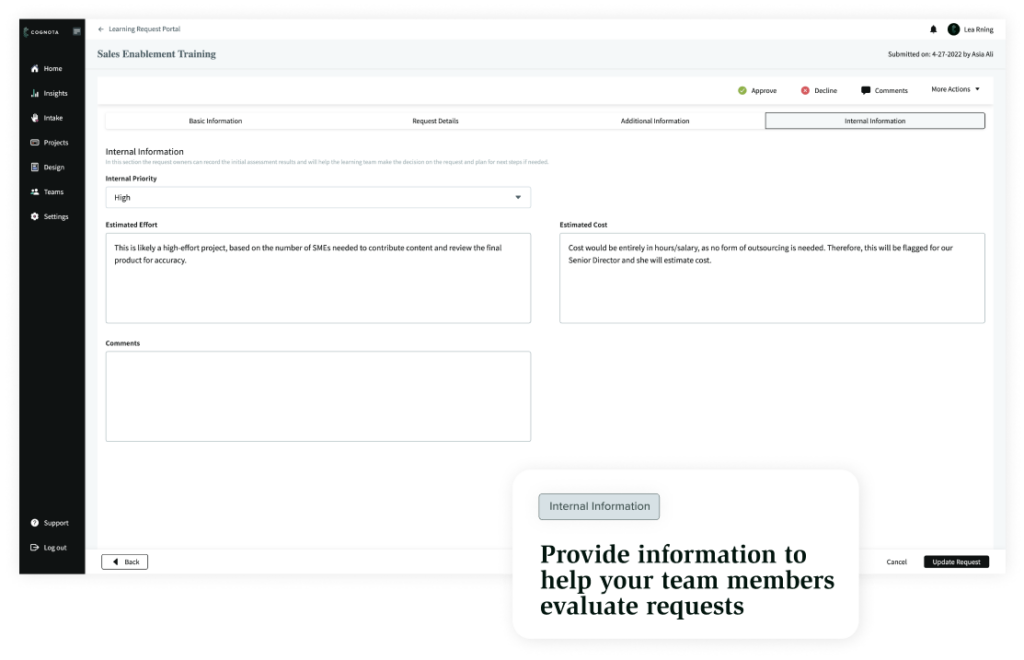
Cognota lets you build custom intake forms tailored to how your team actually works. You can customize questions by department, training type, or training focus, so a request captures different information based on your needs.
Each form is built around three sections:
- General Information: This includes the request title, business unit, and requester name.
- Request Details: Custom questions to surface the context needed for scoping and prioritization.
- Internal Information: A private section for triage notes and priority scoring without exposing internal deliberations to the requester.
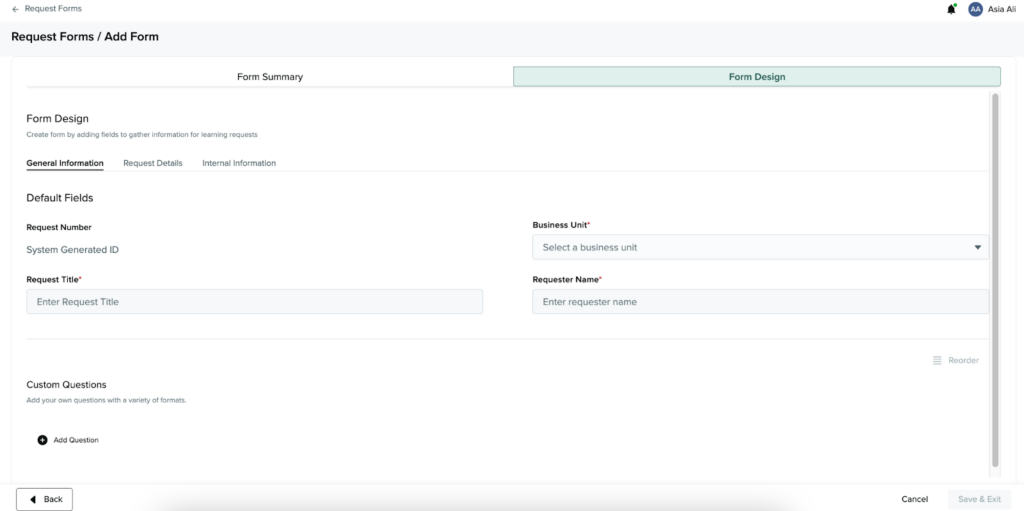
For custom questions, Cognota supports ten field types, including text fields, dropdowns, checkboxes, date ranges, and file uploads. You can add assistive text to any question, giving requesters inline guidance on what to include without cluttering the form itself.
Cognota also lets you duplicate an existing form and modify it for a different department or request type. This saves you the time and effort of building each form from scratch every time.
For example, when a sales team submits a product training request, the form captures business goals, target audience, timeline, and expected impact. Your team reviews it alongside other pending requests, marks it as waitlisted with a clear explanation, and the requester gets an automated notification with the reasoning.
Branded Request Portal to Replace Scattered Intake
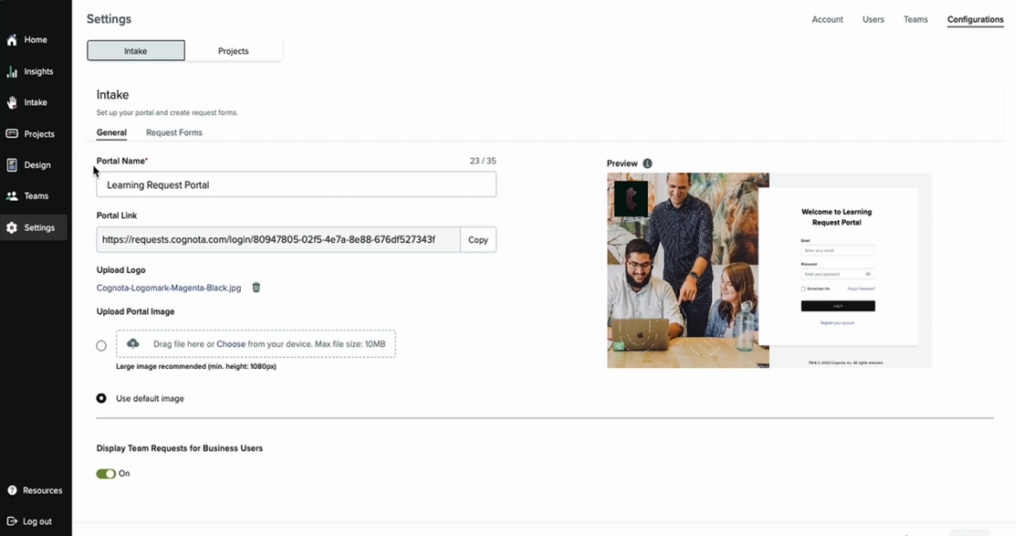
Cognota’s training intake portal gives your organization a single, governed entry point for all training requests.
You can create a custom URL to share via email, link from your LMS or intranet, or add to your team’s email signatures. This makes it easy to promote and adopt across the organization.
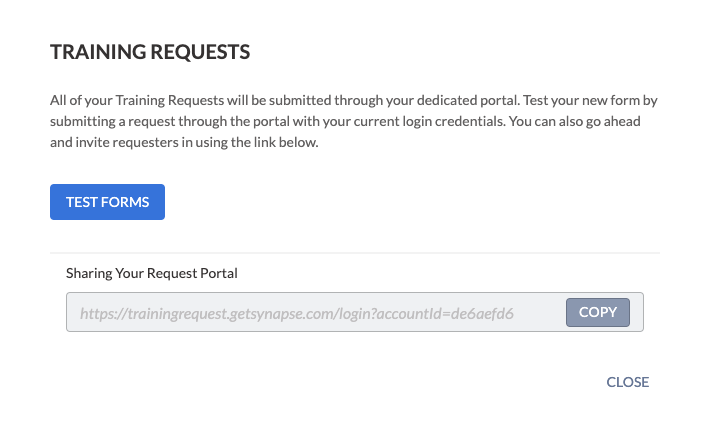
Our platform allows you to host as many request forms as you need, each tailored to a different department or training type. Every submission lands in one centralized view where your full team has visibility into the complete request pipeline.
Training Intake and Project Management to Prioritize Demands
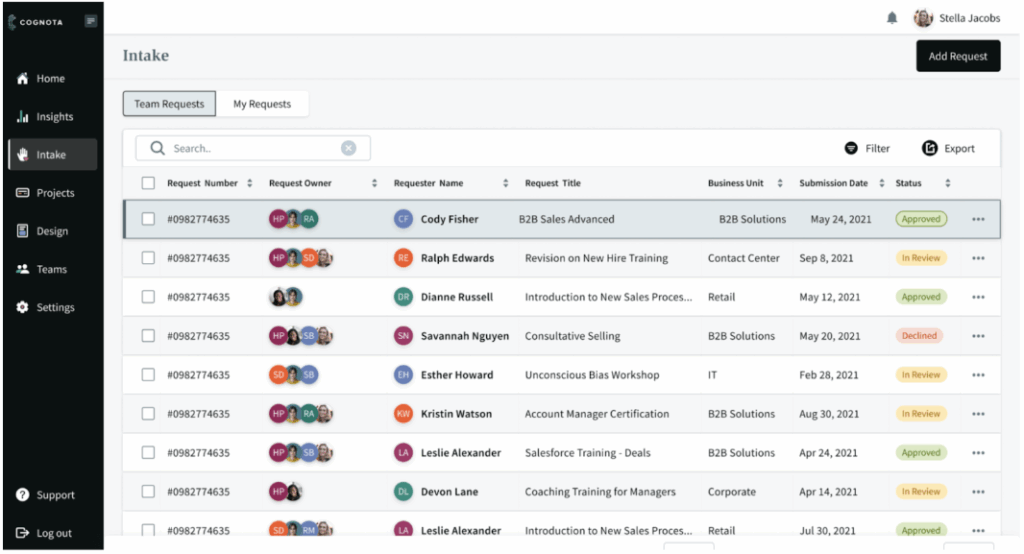
Cognota helps you improve your training intake process. Once a request is submitted, our platform routes it to the right reviewer and keeps business partners informed with automated status notifications at every stage, whether it’s approved, waitlisted, or declined.
Once approved, the system populates the intake data into a new project. Your team can move from scoping to execution. This saves time from re-entering every single field, and your projects stay connected to the original request for context.
Request Analytics to Measure L&D Delivery
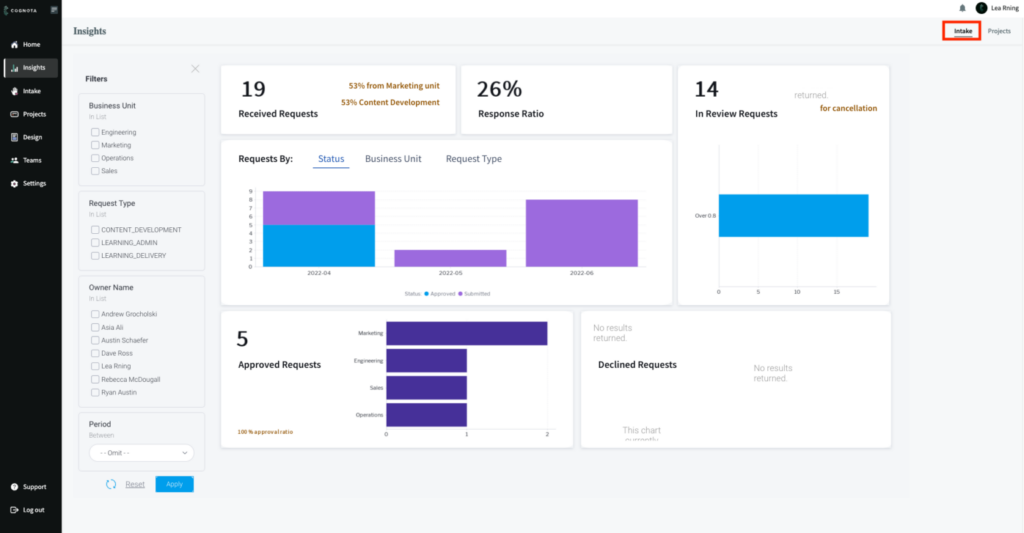
Cognota Insights gives your team visibility into training demand through intake data. You can track key metrics, such as:
- Requests by Status: See how many are in review, approved, waitlisted, or declined across all your forms.
- Requests by Business Unit: Identify which departments are submitting the most requests and through which forms.
- Requests by Request Type: Understand which training categories are driving the most demand.
- Response Ratio: Measure the proportion of requests that have received a decision versus those still sitting in review.
- Approved vs. Declined Requests: See decline rates by form to identify where requests are consistently falling short of prioritization criteria.
This tells you whether your training intake aligns with your business impact, whether you are capturing the right information, which business units are most engaged with the process, and whether your team’s capacity is keeping up with incoming demand.
Bottom Line: Improve Your Training Intake Process With Cognota
The right template can bring immediate structure to a scattered process, but templates alone can’t solve your L&D challenges.
Cognota gives enterprise Talent and L&D teams a purpose-built system for managing training requests from first submission to course delivery. Teams can build request forms, collect forms via a branded portal, review each form against real business context, and convert approved requests into a project.
Book a demo to learn how Cognota turns scattered training requests into a governed intake process that feeds directly into course development.