Enterprises are facing a skills crisis. Nearly half of learning and talent development (L&D) professionals acknowledge that their employees lack the skills needed to execute business strategy effectively. And 39% of all employees will need reskilling by 2030.
Organizations are willing to invest more in training programs, but scaling learning initiatives requires the right technology. L&D teams need platforms to create engaging content, deliver training across distributed workforces, personalize learning experiences, and measure whether programs actually close skill gaps.
In this article, we’ll review 21 best learning and development platforms to consider in 2026. We’ll compare each tool’s key features, pricing, and user experiences to help you choose the right platform for your L&D needs.
Types of Learning and Development Platforms
While there is certainly a crossover between different types of learning and development platforms, we’ve discussed six broad categories:
- Learning Strategy, Planning, and Management: This is a LearnOps platform that brings L&D projects to a single governed system. It helps teams plan training, prioritize demand, allocate capacity and resources, and maximize ROI with real-time insights.
- Content Authoring Tools: These help teams create interactive multimedia training content without technical skills and usually integrate with LMS platforms.
- Microlearning Platforms: These solutions deliver short and focused content that employees can access on any device during their workday.
- Learning Management Systems (LMS): These allow teams to organize, track, and manage training programs, course assignments, and compliance reporting.
- Learning Experience Platforms (LXP): They help personalize learning environments with AI-powered recommendations that focus on employee-driven skills.
- Learning Measurement Solutions: These are analytics platforms that measure training effectiveness, ROI, and business impact through automated reporting and data integration.
Before investing in any solution, identify your internal needs and use cases to make sure the platform aligns with your organization’s learning and development strategy.
Cognota: #1 LearnOps Platform for Learning Strategy, Planning, and Management

Cognota is a purpose-built learning operations (LearnOps) platform for enterprise L&D teams with 5,000+ employees managing hundreds of training requests, projects, and programs.
Cognota gives you operational control and visibility, so you can capture requests, plan capacity, track projects, and measure impact. It connects your entire learning lifecycle in one system, from intake through delivery.
Here’s how Cognota unifies L&D operations, optimizes learning efficiency, and proves ROI at scale:
Training Intake and Request Management to Prioritize Demand

Enterprise L&D teams manage hundreds of training requests through scattered channels like email, Slack, and chats. Without a centralized system, teams can’t see the full demand pipeline, compare requests objectively, or justify prioritization decisions to stakeholders.
Cognota centralizes training intake and management:
- Request portal: A self-service portal that allows everyone to submit and track requests.
- Custom forms: Customize intake forms by business unit or training type to get relevant information for different types of requests.
- Custom fields: Add specific fields to capture business goals, target audience, timeline, and expected impact.
- Internal-only sections: Set private sections visible only to the L&D team for adding evaluation notes, priority scores, and initial feedback.
- Rule-based routing: Automatically route requests to designated L&D team members and send email alerts.
- Status control: Track and update request status at each stage (in review, approved, waitlisted, or declined) with automated notifications.
- Quick conversion: Convert approved requests directly into projects with all context and data.
This allows L&D teams to prioritize the right requests and plan resources and timelines before committing capacity.
Custom L&D Workflows to Standardize Processes and Stages

Without clear workflows, L&D teams lack visibility and context to plan training programs effectively.
Cognota helps you standardize L&D workflows, so every project follows the same process from start to finish. You can set up your process once, and every initiative flows through the same stages.
For example, you can set up your stages like request, needs analysis, design, development, review, and launch. If 15 projects are running simultaneously across your team, everyone can see where each project sits.
Cognota tracks each project’s status, priority, health, and business alignment from a single dashboard. This allows L&D managers to compare workload and spot issues quickly.
The platform helps you break down tasks with clear assignees and deadlines. Team members track their actual effort against estimates. This creates visibility into who’s working on what, where capacity is tight, and whether timelines are realistic.
Managers can see weekly resource allocation across the team and make informed decisions about taking on new work or adjusting priorities. This helps you achieve predictable execution that your stakeholders can trust.
As demand increases, the team can also scale since the workflows are repeatable, not reinvented with every project.
Project and Task Management for Profitable L&D Delivery

Generic project management tools like Asana or Monday aren’t built for learning projects. This forces L&D teams to customize heavily just to track basic information like target learner audience, the delivery method, and how the program connects to strategic goals.
Cognota offers project management designed for LearnOps. It allows you to view, track, and manage your projects from a single platform. When the approved request is turned into a project, our platform brings all the details without manual entry.
You can see all your projects and tasks in two views:
- Kanban boards
- List view
Each project card displays key details like status, due date, and priority. You can drag and drop the cards on specific processes or stages.
Cognota also allows you to add and assign tasks to specific team members within the project. Each task can include a title, set start and end dates, and estimate how many hours it will take. You can also group related tasks to assign multiple connected items at once. The assigned member receives an automatic notification that they’ve been given the task.
This gives you real-time visibility into workload distribution. Managers can see who has bandwidth and who’s approaching burnout before it becomes a problem.
Capacity and Resource Management to Balance Team Workloads

When L&D can’t see capacity, resources get allocated based on who was the loudest, not what matters most to the business.
Cognota offers capacity and resource management, giving you real-time visibility into team workloads.
Each team member can set their default weekly capacity in the system. When you assign someone to a project, you see their allocated hours vs available hours for that time period. You can easily track if someone has bandwidth or if they’re already overloaded before you commit to new work.
The resource allocation view shows a weekly breakdown across all active projects. You can view:
- Team members assigned to each project
- Weekly hours allocated for every person
- Remaining available hours after current commitments
- Load split across internal teams, business partners, and external vendors
- Capacity filtered by specific projects, programs, or business units
Cognota also tracks estimated hours versus actual hours spent on tasks. It gives you data-driven insights so that you can plan impact-driven learning programs based on your capacity and resources.
You can also use these insights to show stakeholders capacity workloads, optimize budgets, and maximize learning efficiency.
Program-Level Visibility for Clear Oversight

Most L&D teams run several related projects simultaneously. Without a shared view, managers struggle to see how an entire initiative is performing across all its component projects.
Cognota lets you group related projects together so you can track their combined progress in one place. Here’s what each program includes:
- Program name and description
- Program owners and stakeholders
- Status and delivery type (virtual, blended, in-person)
- List of all connected projects
- Key metrics on progress and completion
This program dashboard shows risks and delays across all connected projects, so you can resolve issues before they escalate.
For example, a New Hire Onboarding program can include IT systems training, compliance certification, and department-specific orientation modules. You can view these projects on the program dashboard to set onboarding timelines, view progress, and share with stakeholders.
Content Governance and Authoring to Maintain Learning Quality
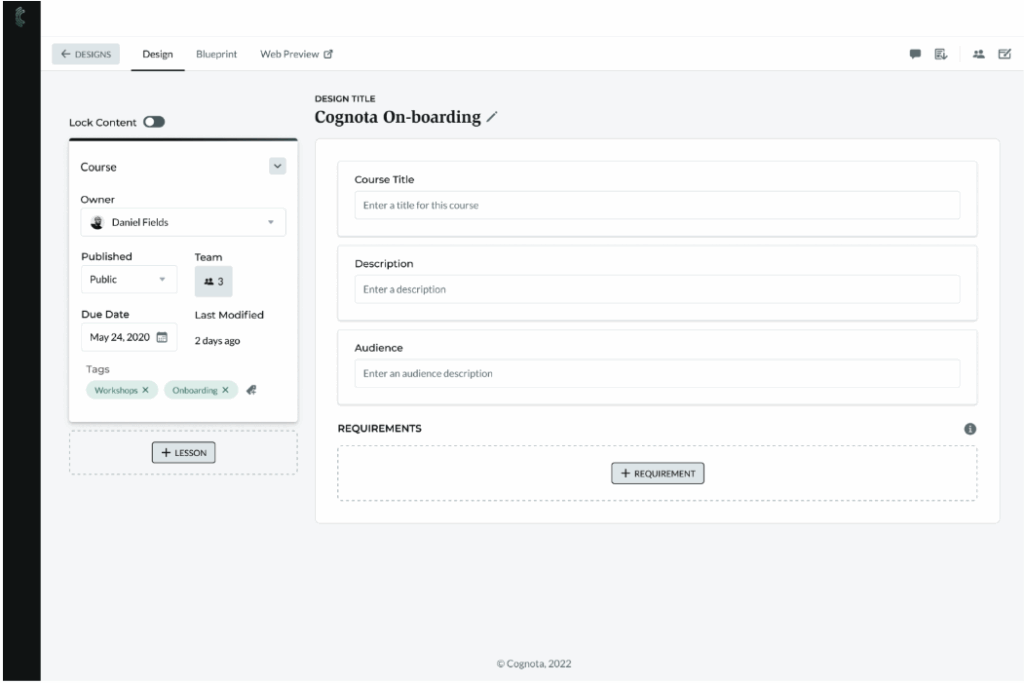
Without standardized templates, every designer builds content using different structures, inconsistent branding, and quality standards. This confuses learners, while L&D teams can’t maintain quality control across the portfolio.
Cognota offers a built-in authoring environment to standardize your content creation. You can use pre-built templates and blueprints, so SMEs, business partners, and facilitators follow the same structure every time.
Within each template, you can organize content into logical sequences, so the content maintains consistent quality regardless of who creates it. You can add branding, layout, hierarchy labels, and asset types.
Cognota’s authoring system also allows you to:
- Use the content editor for text, images, videos, and interactive elements
- Create Knowledge checks and graded assessments with multiple question types
- Use collaboration tools to invite reviewers and track feedback
- Export in multiple formats (SCORM, PDF, PowerPoint, shareable web links)
- Maintain version control, so updates push everywhere the content is used.
During course creation, Cognota guides users through defined learning objectives using a built-in verb picker based on Bloom’s taxonomy. It helps authors be specific about what learners should actually be able to do after training. This makes it easier to connect training to measurable behavior change and demonstrate ROI.
For example, a product manager creating training on a new software release on Cognota. Instead of writing “understand the new features,” the verb picker guides them to specify “configure the automated workflow tool for three common use cases.” This helps L&D track if users actually configure workflows correctly and shows training effectiveness.
Analytics & Insights for Informed Decision-Making

When L&D data lives in spreadsheets, slides, and disconnected tools, it’s hard to show real business impact.
Cognota’s L&D dashboard consolidates your intakes, requests, projects, and delivery data and turns them into actionable insights. You can track demand patterns, project health, team capacity, and approval rates.
Cognota offers different types of L&D Insights dashboards:
- Intake Insights: Track total requests, response times, approval rates, and decline reasons by business unit or form.
- Project Insights: View active projects by status, priority, health, and owner. Track tasks by completion status, including overdue items.
- Capacity Insights: See demand hours, capacity hours, available hours, and utilization by team or manager.
- Portfolio Insights: Group related projects to track program-level progress. View projects completed, at risk, and overdue with status and dates.
You can filter dashboards by date range, owner, business unit, request type, or status.
Cognota also lets you build custom reports with a KPI scorecard, comparison tool, and answer summary. You can use these reports to compare performance across teams, measure impact, or track KPIs that matter to your business.
LearnOps AI for Smarter Decision-Making
Cognota’s LearnOps AI gives you instant access to critical L&D data through conversational queries. Our AI tool analyzes your intake data, project portfolio, capacity metrics, and program performance to generate data-driven insights.
Instead of clicking through multiple dashboards, you can ask natural language questions and get immediate answers.
Here’s what our learning and development AI tool helps with:
- Instant answers to data queries across intake, projects, and capacity
- Predictive insights that flag risks before they impact delivery
- Trend identification across requests, departments, and program types
- Automated recommendations for resource allocation and prioritization
- Real-time training analytics without manual report building.
Integrations
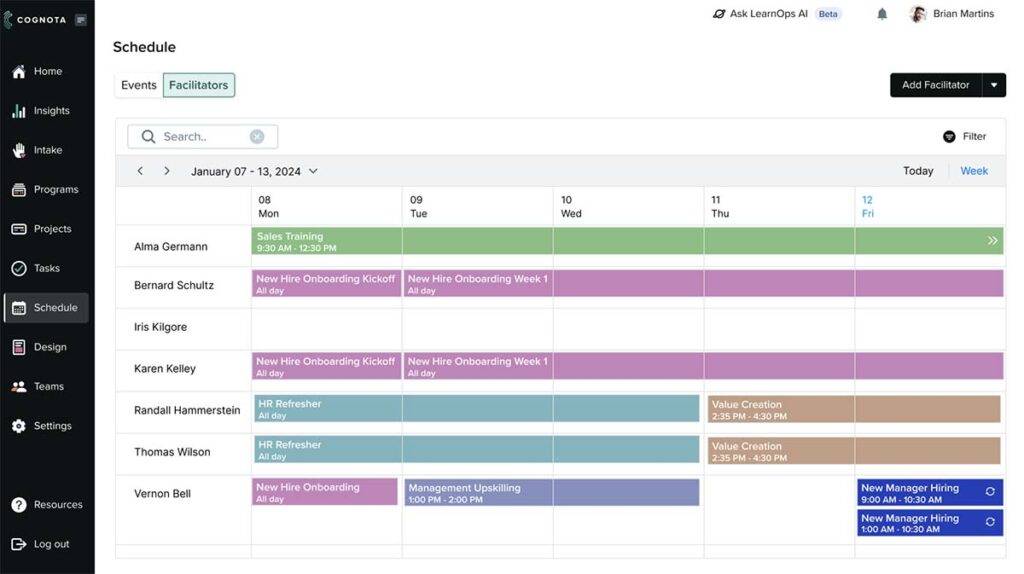
Cognota offers out-of-the-box integrations to consolidate all your existing learning tech stack into one dashboard. This way, your L&D data flows across multiple systems, allowing you to replace old systems, manage facilitators, and execute learning programs more effectively.
Key integrations include:
- Learning Management Systems (LMS): Export content as SCORM packages or publish directly to your LMS. Track learner progress and completion data through xAPI integration.
- Single Sign-On (SSO): Allow secure authentication through SAML integration, so users can access Cognota with their existing corporate credentials.
- HR and HCM platforms: Connect with HR systems to sync employee data, organizational structures, and talent management workflows.
- Finance and procurement tools: Integrate budget tracking and resource allocation data with finance systems for better cost visibility.
Cognota also provides an API for custom integrations and maintains a Connector Marketplace where technology partners can integrate their tools.
Cognota Pricing
Cognota offers custom pricing depending on your L&D needs and use case.

Content Authoring Tools
The following are some of the best authoring tools for L&D content creation:
Articulate

Articulate is a content authoring suite built for mid-sized and enterprise L&D teams, instructional designers, and eLearning developers. The platform offers two main authoring tools: Storyline 360 for custom courses and Rise 360 for mobile-responsive courses.
Many users praise Articulate’s storyboard feature, but find inputting data into the system or editing hard. Some teams also complain about the expensive pricing.
Articulate Key Features
Here are the key features of Articulate:
- Offers interactive training content creation without coding
- Supports quiz interactions, simulations, and scenario-based learning
- Provides 13M+ templates, stock photos, videos, and icons
- Supports branching logic and instant feedback
- Allows publishing to any LMS in multiple formats
- Includes AI assistant tools for course creation
- Provides multi-language support
Articulate Pricing
Articulate pricing plans start from $1,749 per user per year for teams.
Adobe Captivate

Adobe Captivate is an eLearning authoring tool built for enterprise L&D teams and instructional designers. This platform is best for teams that want interoperability with other Adobe tools, such as the Adobe Creative Suite.
Many users complain that it’s hard to edit complex content, including simulations, and the system crashes frequently.
Adobe Captivate Key Features
Here are the key features of Adobe Captivate:
- Uses generative AI to create images, text, and avatars
- Converts PowerPoint presentations into interactive eLearning courses
- Creates responsive courses that adapt to all screen sizes
- Builds interactive videos, simulations, and branching scenarios
- Publishes courses in SCORM and xAPI formats
- Offers AI-powered text-to-speech with multiple languages and voices
Adobe Captivate Pricing
Adobe Captivate pricing starts from $39.99 per month per user.
Elucidat

Elucidat is a cloud-based eLearning platform designed for large L&D teams that need to create training content at scale.
However, many users complain that Elucidat offers less design flexibility, editing options, and customization.
Elucidat Key Features
Here are the key features of Elucidat:
- Creates mobile-responsive courses that adapt to all devices
- Translates content into 75+ languages
- Allows collaboration with built-in review and commenting tools
- Publishes courses in SCORM, xAPI, and HTML5 formats
- Offers AI-powered content generation for intros, summaries, and checks
- Provides PowerPoint import to convert slides into eLearning
Elucidat Pricing
Elucidat pricing plans start from $1,650 per year for up to 5 users.
iSpring Suite

iSpring Suite is a PowerPoint-based eLearning authoring toolkit that converts existing slides into interactive and SCORM-compliant courses.
However, the platform is suitable for users who use Windows and a desktop version of PowerPoint. Many users complain about limited customization and branding options.
iSpring Suite Key Features
Here are the key features of iSpring Suite:
- Supports a wide range of content library and templates
- Creates 14 types of quizzes with branching and feedback
- Records screen tutorials with automatic tooltips and annotations
- Builds dialogue simulations for communication and sales training
- Publishes courses in SCORM, xAPI, AICC, and cmi5 formats
- Provides an AI assistant for generating course text and images
iSpring Suite Pricing
iSpring Suite pricing plans start from $970 per user per year.
Microlearning Platforms
The following are the top microlearning platforms for L&D operations:

7taps is built for L&D teams at mid-to-large enterprises that need to create bite-sized training through Slack, Teams, email, or SMS that fits into employees’ workflows.
Many users praise its user-friendly interface, but complain that the platform lacks organizational hierarchy features and advanced reporting tools.
7taps Key Features
Here are the key features of 7taps:
- Creates 3-5 minute courses with story-driven, scrollable card design
- Delivers content via one-click links without app downloads required
- Uses AI Copilot to generate scenario-based learning
- Publishes courses in SCORM format for LMS integration
- Syncs with 45+ HRMS platforms for automated enrollment
- Tracks engagement, completion rates, and learner journey analytics
7taps Pricing
7taps offers custom pricing plans.
SC Training (EdApp)

SC Training, formerly known as EdApp, is a mobile-first microlearning LMS that helps L&D teams design bite-sized training programs.
SC Training Key Features
Here are the key features of SC Training:
- Uses spaced repetition to automatically resurface content for retention
- Generates AI courses from existing documents, PDFs, and slides
- Provides 1,000+ pre-built industry-specific templates ready to deploy
- Sends push notifications directly to employee devices for reminders
- Tracks real-time completion rates, quiz scores, and engagement metrics
SC Training Pricing
SC Training offers custom pricing plans for enterprises.
Axonify

Axonify is an AI-powered reinforcement platform built for L&D teams that need to identify learning gaps and build long-term behavior change for frontline workers.
Axonify Key Features
Here are the key features of Axonify:
- Supports AI adaptive learning for personalized training sessions
- Uses a spaced repetition algorithm to resurface content
- Provides pre-built microlearning topics across frontline industries
- Gamifies learning with leaderboards, points, badges, and prize redemption
- Tracks data points per user to link training to business outcomes
- Supports 60+ languages with automatic translation for global teams
Axonify Pricing
Axonify offers custom pricing plans.

Qstream

Qstream is a microlearning app developed at Harvard Medical School for scenario-based learning.
The tool is best for L&D teams that already have foundational training programs and need a reinforcement layer for knowledge retention and application.
Qstream Key Features
Here are the key features of Qstream:
- Uses spaced repetition and retrieval practice based on neuroscience research
- Generates AI-powered courses from prompts or existing materials
- Gamifies learning with leaderboards, badges, and team competitions
- Integrates with LMS and CRM platforms
- Provides manager dashboards with proficiency heatmaps
Qstream Pricing
Qstream offers custom pricing plans.
Learning Deployment Systems (LMS and LXP)
The following are learning deployment platforms, including learning management systems (LMS) for structured course delivery and learning experience platforms (LXP) for learner-driven experiences.
Docebo

Docebo Learn LMS helps enterprise teams deploy and manage training programs at a global scale. The platform is best for multi-audience training needs and helps you consolidate multiple learning tools into a unified system.
But many users complain that Docebo requires extensive training and onboarding setup that enterprise teams can’t afford.
Docebo Key Features
Here are the key features of Docebo:
- Offers a drag-and-drop configuration engine for learning pages
- Automates enrollments, translations, content tagging, and administrative workflows
- Supports multi-tenant architecture
- Provides unlimited cloud storage
- Integrates with HRIS, CRM, SSO, and collaboration tools
- Offers customizable analytics dashboards
- Supports a native mobile app with offline access
Docebo Pricing
Docebo offers custom pricing.
TalentLMS

TalentLMS is built for growing businesses that need simple, scalable, and affordable training solutions. It helps L&D teams build, organize, customize, deliver, and scale training for organizations of all sizes.
TalentLMS Key Features
Here are the key features of TalentLMS:
- Generates courses, tests, flashcards, and thumbnails
- Supports SCORM, xAPI, and cmi5 for importing existing e-learning courses
- Integrates with Slack, Zoom, Salesforce, BambooHR, and Zapier
- Provides learning paths to guide learners through connected courses
- Supports a branded mobile app
- Offers real-time reports and custom analytics
TalentLMS Pricing
TalentLMS offers four pricing tiers. The basic plan starts from $149 per month for up to 40 users.
Absorb LMS

Absorb LMS is a flexible learning platform designed for enterprise teams that want to build and manage training programs for internal and external stakeholders.
Absorb LMS Key Features
Here are the key features of Absorb LMS:
- Offers AI-powered personalized learning paths
- Supports observational checklists for on-the-job verification
- Automates workflows based on completion and deadlines
- Offers two-way Salesforce syncing
- Includes built-in eCommerce module
- Supports Absorb Pinpoint to transcribe and timestamp video lessons
- Provides custom dashboards with forecasting visuals
Absorb LMS Pricing
Absorb LMS offers custom pricing plans.
Tovuti LMS

Tovuti LMS provides training and learning management capabilities for teams to create courses, deliver training, and track learner progress.
Tovuti LMS Key Features
Here are the key features of Tovuti LMS:
- Provides an AI course builder for course creation
- Includes 40+ gamified elements with leaderboards and badges
- Automates enrollments, certifications, and compliance renewals
- Offers built-in virtual classrooms with video conferencing
- Supports multi-audience portals for employees and customers
- Provides real-time dashboards tracking completion and performance
Tovuti LMS Pricing
Tovuti LMS offers custom pricing plans based on your business size and needs.
LXP by 360Learning

360 Learning’s LXP is an AI-powered management platform built for teams that want to curate skills-based learning at scale.
360Learning LXP Key Features
Here are the key features of 360Learning LXP:
- Provides AI-powered personalized course recommendations
- Offers skills mapping showing current versus desired capabilities
- Aggregates content from third-party providers and internal sources
- Supports mobile learning with offline access
- Integrates with SAP, Workday, Salesforce, Microsoft Teams, and Slack
360Learning LXP Pricing
360Learning pricing starts from $8 per user per month for up to 100 users.
LearnWorlds

LearnWorlds is a cloud-based learning management system built for corporate L&D teams and content creators. The platform is widely known for its interactive video player feature that supports active learning.
LearnWorlds Key Features
Here are the key features of LearnWorlds:
- Provides an interactive video player with auto-extracted transcripts
- Offers an AI Assistant for course creation
- Includes white-label mobile app builder for iOS/Android
- Supports SCORM compliance for standardized eLearning content
- Integrates via Zapier and native connections
- Offers an AI-powered reports center with scheduled deliveries
LearnWorlds Pricing
LearnWorlds pricing plans start from $29 per month.
Continu

Continu is a conversational learning platform purpose-built for L&D that operates with remote or hybrid teams. It helps you curate journeys and workflows for employee training and upskilling.
But many users complain that the platform is hard to navigate and offers limited learner progress reports.
Continu Key Features
Here are the key features of Continu:
Provides AI-powered content recommendations for personalized learning
Automates workflow assignments based on role changes/triggers
Includes built-in course authoring tools with real-time preview
Supports VILT workshops via Zoom, Google Meet, MS Teams
Provides intelligent segmentation by department, skills, or location
Offers real-time analytics dashboards tracking engagement and completion
Continu Pricing
Continu offers custom pricing plans based on your business size.
Thrive

Thrive is an all-in-one learning and skills platform built for L&D teams that want to encourage peer-to-peer learning and upskilling.
Thrive Key Features
Here are the key features of Thrive:
- Provides federated search across all connected workplace systems
- Supports AI-powered mentor matching for structured development programs
- Allows one-click content generation from prompts and PDFs
- Automates compliance tracking with real-time manager dashboards
- Supports 70+ languages with auto-detection for global teams
- Provides adaptive learning recommendations based on user goals
Thrive Pricing
Thrive pricing starts from $22,300 per year for up to 150 users.
Learning Measurement Solutions
The following are some learning measurement solutions you should know:
Explorance Blue

Blue is a feedback analytics platform that connects learner evaluations to teaching effectiveness and program outcomes. The tool automates feedback collection, uses AI to analyze qualitative comments, and benchmarks results.
TalentGuard

TalentGuard is a talent intelligence platform for L&D teams that want to show workforce readiness and align employee development with business goals.
It uses real-time assessments, manager evaluations, and performance data to identify skill gaps. Then, it connects those gaps to personalized learning paths and measures whether training closes them.
PeopleGoal

PeopleGoal is a performance management platform that tracks employee goals, skills development, and engagement. It helps L&D teams connect individual performance data to learning plans and career development pathways.
Trakstar Perform

Trakstar Perform is a performance management platform that tracks goals, competencies, and 360-degree feedback. The tool connects performance reviews directly to training courses through integration with Trakstar Learn.
How to Choose the Right Learning and Development Platform
Here’s how you can choose the right learning and development platform:
Identify Your Learning Objectives
Define what you want to achieve with training, such as compliance, skill development, onboarding, or behavior change.
Your platform choice should directly support these goals, so you can connect learning initiatives to measurable business outcomes.
Evaluate Your Use Case Scenario
Make sure the platform fits your specific training scenarios:
|
Organization Type |
Primary L&D Challenge |
Best Platform Type |
|
Small or emerging L&D teams (50-500 employees) |
Creating content quickly without dedicated production resources |
Simple AI tools for authoring, video, transcription, and search |
|
Mid-size L&D teams (500-2,500 employees) |
Managing incoming requests and maintaining visibility into team workload |
Intake and project tracking tools + AI authoring and video tools |
|
Enterprise L&D teams (2,500-5,000 employees) |
Balancing capacity across projects, proving portfolio value to leadership, and managing multiple business units |
LearnOps platform for demand management, capacity planning, and portfolio reporting + AI authoring, video, and knowledge management tools |
|
Large enterprise L&D teams (5,000+ employees) |
Governing training operations across multiple business units with different needs while maintaining oversight |
Fully integrated stack: LearnOps platform, LMS/LXP, AI authoring and video tools, assessment platforms, and analytics tools |
|
Content-heavy organizations |
Updating hundreds or thousands of existing training assets efficiently |
AI tools for course updates, video creation, and content search with strong metadata and search capabilities |
Content Creation Tools
Look for a content authoring platform that offers features like governance controls, templates, multimedia support, and branding options across all training materials.
Workflow Customization and Collaboration Tools
Check if you can configure intake forms, approval processes, and project stages to match how your L&D team operates.
The platform should also support cross-functional collaboration. This allows stakeholders, executives, and managers to submit requests, review content, and track progress without endless email chains.
Consider Your Capacity and Resources
Evaluate whether the platform provides real-time visibility into team workloads, timelines, and resource allocation across all active projects.
This helps you forecast resource needs, compare total demand against available capacity, and make informed decisions about which projects to prioritize.
Integrations with Existing Tech Stack
Verify that the platform connects with your LMS, HRIS, SSO, and other tools you already use. Smooth data flow between systems prevents manual data entry, reduces errors, and eliminates information silos.
Reporting and Analytics Capabilities
Look for platforms that track training effectiveness, improve business impact, and prove ROI without requiring manual report building. Executive-ready dashboards should connect learning programs to performance metrics, like productivity, retention, and revenue.
Bottom Line
Learning and development platforms are designed for singular learning needs. Some focus on content creation or learning, while others help teams deliver measurable outcomes. But L&D teams need a comprehensive tool to coordinate, plan, author, collaborate, and deliver training programs.
Cognota is a LearnOps platform built to manage the full operational L&D lifecycle. It offers intake management, capacity planning, resource management, content authoring, project management, and ROI analytics.
Cognota acts as an orchestration layer by integrating with your LMS, LXP, and content tools rather than replacing them. This helps you and your leadership make data-driven decisions about L&D investments, justify budgets with clear ROI metrics, and align training initiatives with strategic business goals.
Book a demo to see how Cognota helps L&D teams handle more training requests, deliver programs faster, and demonstrate measurable business impact.